Thursday, 6 February 2014

5 Styles: Listening

5 Styles: Listening
  • Reggae
  • Funk
  • Latin
  • Blues
  • Electro

Reggae Songs

1. Mike Brooks - Money Is Not All + Dub
2. King Tubby - Waterhouse Rock

Question 1: In the first song, describe the melody (especially saying what notes it uses - feel free to use a keyboard to help you with this).

Answer 1: The melody for the 1st song is skanked. This is a common attribute in reggae music. It also creates a calm atmosphere as no instruments are right in your face, they blend well with each other.


Question 2: For each song, name the style/genre of the song and list three things (musical and/or sonic) that support your assertion.

Answer 2: Song 1 is in the Reggae genre. You can tell this because of the way the instruments are being played (the guitar is being skanked) which is a very common factor of a reggae song, It also has a slow tempo that gives it a relaxing vibe which is typical of an old reggae song. Song 1 has two types of genre though as half way through it changes into Dub, you can tell this because the drums become a more prominent factor of the song and the bass becomes more clearer as the vocals are not present and you can hear more effects without the vocals, these are all attributes that make a Dub song. 

Funk Songs

1. Parliament - Flashlight
2. Sly & The Family Stone - If You Want Me To Stay

Question 1: Describe the mixing and panning in this track. (Which instruments are prominent and which are in the background; which are central, which are left and which are right?) Make some suggestions about why the track has been mixed and panned in this manner.

Answer 1: Out of all the main instruments i can hear the most prominent one is the bass guitar followed by the trumpet and then finally the piano. There also appears to be an organ beneath the instruments it can be briefly heard at 1:00 - 1:08. It is mixed in this way because the producer wants the most important sound (main melody) to be prominent to the listener. The bass guitar is in the mono setting and is panned to both sides this creates a more fuller and rich sound. It also allows instruments to be behind it without any interference.

Question 2: Is this track a funk track? What musical / sonic components of the track suggest that it is and which suggest that it is not?

Answer 2: The track is a funk track but not a typical funk track but like many genres there are different styles. A Typical funk track would normally have a melody mainly that consists of a guitar & a brass instrument E.g Trumpet/ or a woodwinds instrument (sax) although this track has those it is not at the same tempo as a regular funk song.. E.g. James Brown - Get Up Is a faster, louder and traditional funk track. With that being said the song still has the composing styles of a funk song. E.g. the chords, the notes, duration etc.

Latin Songs

1. The Girl from Ipanema - Astrud Gilberto, João Gilberto and Stan Getz
2. The Girl From Ipanema - Amy Winehouse

Question 1: Give an account of the vocals in this track. Things to consider: effects, timing, style, articulation/phrasing, improvisation etc.

Answer 1: The vocals have been given a soft bit of reverb, Also the singer pronounces words different to make the lyrics match the instrumental this is because the remade instrumental is faster than the original and the words must be either said slower or faster and in this case they are said faster. With the instrumental being faster the singer has had to improvise quite alot as the normal duration of a verse/chorus is shortened due to the speed of the instrumental.

Question 2: Compare this track with the other version above. Does the track feel different? If so, why?

Answer 2: The remake is made in a different speed so the feel is different but the original concept of BossaNova is still kept, The Lyrics have been changed slightly aswell to fit the singers preferences. But the way the singer sings in the remake is the same as the original, Slow and soft.

Blues Songs

1. Jimi Hendrix - Red House
2. Bob Dylan - Subterranean Homesick Blues

Question 1: Describe the harmony in this song. (Try and describe the pattern even if you cannot pick the chords - eg. the first chord lasts for two beats then it changes to a chord that last for 8 bars). Is the pattern familiar at all? 

Answer 1: The song has a rock n roll feel to it (fast paced) the song is upbeat. The main melody of the song is the guitar which is repeated throughout there is a change in the song where a harmonica becomes the main focus. This is to break up each of the verses. The vocals are done in laid back fashion this is to make the lyrics stand out & be memorable. i would describe this song as a "sing along" song, as its a worldwide known song.

Question 2: This song has "Blues" in the title. Is it a blues song?

Answer 2: Yes & No, it is classed as blues because of the opening sequence of the melody 
and also because Bob Dylan is defined as a blues artist. But the main melody reminds me of a rock and roll style and the fast paced style of the instruments and vocals is unusual for this type of genre.

Electro Songs

New Order - Blue Monday Original 12" Version

Question 1: Give as clear as possible an account of all the different sounds and instruments in the first 3 minutes and 35 seconds. You probably won't know exactly how each sound is made but you should be able to make an educated guess whether something is sampled, synthesized or actually recorded in.

Answer 1: Some of the sounds have been recorded live and then manipulated for example the kick drum is recorded live and then manipulated to be added several times because it cant be played that speed by a human. The synths and all the rest of the other instruments are recorded live. 

Question 2: What is this song about? How do the electronic instruments / sounds help to create the mood?

Answer 2: The Electronic instruments have an upbeat tempo which creates a sense of joy and puts the listener in a dancing mood.

Tuesday, 10 December 2013

Functions of a Keyboard

Functions of a Keyboard

Piano Pedals
The Sustain Pedal (the rightmost pedal)

When the sustain pedal is depressed it stops the damper bar from returning to the string resulting in the note continuing on without being pressed, Also other notes around the main note will also ring softly creating more harmonic sounds.

The Sostenuto Pedal (the middle pedal)

When the sostenuto pedal is depressed it stops the damper bar from returning to the string of that particular note and this will continue to sustain for as long as the pedal is depressed and any note played after that will not sustain so this helps players play bass notes whilst playing notes over that.

The Una Corda Pedal (The leftmost pedal)

When the Una Corda Pedal is depressed it moves the hammer to the right which makes it hit only 2 strings instead of 3, this softens the note and modifies the tone quality.

Difference between Grand Piano & Upright Piano
The main difference is the piano action, as the Upright Piano is sensitive and is not very good at capturing a true essence of a song, The Grand Piano is able to play notes in quick repetition as the the hammer hits the strings in a downwards motion whereas on a upright piano the hammer hits the strings from the side  meaning that it is slower.
The price of a Grand Piano is much more than the price of Upright Piano.
The pedals on the the upright piano have a different effect on the piano as the hammer and strings are set up in a different way. E.g. The Una Corda pedal does not move the hammer sideways, it just moves it closer to the strings.


Midi Keyboards
The parameters you can control using a midi keyboard are; Velocity, Timing, Data in to software and Duration.

By pressing the keys hard you can make the data input to have a high velocity and by pressing them soft you can make the velocity lower. you choose when a note is played and the duration of it by pressing it when you want it played and by holding it down to increase the duration.
There is also a pitch bend on some midi controllers that can be used when a note is played to change the pitch.

Using a sustain pedal on a midi controller will make the software sustain that one note no matter what instrumental that it is, for as long as it is pressed down. But with a piano the note that is sustained will begin to lose velocity whereas using a sustain pedal on a midi controller the velocity will remain the same throughout.

Using a midi controller instead of recording straight from a piano has some advantages as well as some disadvantages. An advantage of using a midi controller is that you can edit data that is input into the software. For example you can shorten note lengths if played for too long, you can remove notes that are played by mistake. You can also change different things about the note like velocity, the way it is played e.g. if it slides or normal.
Disadvantages about using a midi controller are that it will not have the natural feel to it that a piano will have, also it takes away the natural ability to play a piano as it can be edited whereas using a piano it must be done in one take.

Marketing Yourself

Marketing Yourself

The Website i created was created using weebly, i used the free domain for now but in the future i will upgrade it so that is more professional, I would also like to include a professional logo that will be placed in the top left corner of the screen.

Like how this one has 'GDMLDN' in the top left i would like a more professional logo to be placed there

Also as you can see the header contains a stock image. once i purchase the domain i would like that to be a picture of the members of GDMLDN.


I have created a soundcloud as a way of showcasing my music quickly and being able to embed it into websites, This way i can keep people in my website and them being able to see my work rather than having to leave the website and possibly lose interest.


Another good way of displaying music is creating a bandcamp as people can donate if they want to, this is a good way of releasing a mixtape as people can donate whatever they feel like also it doesn't restrict your audience as you are not forcing them to buy it like how you may if it were to be put on iTunes


If i were to go for a completely professional feel with a separate home page that then sends you to proper
website i would do something like this. 

As you can see you can see the logo clearly as the colours contrast and the social icons are clear and its clear to see and is clean.


Website
I made my website the way it is because i feel that the way it is laid out is clean and easy to navigate through, I embedded my soundcloud files into the website because now my target audience will be able to listen to my music and stay on my website and not stray away from it and get distracted.


An amazing example of a professional website
Using a brilliantly designed website as a template to build mine has really helped.
Seeing how it should all be laid out, but as i have not released anything as an artist i cant have a separate page for my two crafts as i have only release stuff as a producer. 

In this picture you can see the website owner has two pages for their work aswell as having videos 

Business Card Ideas
My Business card design
Having a business card is great for face to face situations, as you can just hand someone your card and look professional rather than having to hunt around for a pen and paper to write your contact details down.

On my business card i have included my email address, my YouTube account and the name i am known as whilst producing and rapping.

Handling Social Networking sites
Handling the sites should be easy as there are several sites that allow you to control all sites at on time.
A good example of a site like this is ifttt.com, it allows you to create triggers and actions E.g. if you upload a picture on instagram it will automatically be saved into your dropbox folder 

The Website is easy to navigate through as the tabs and pages are labelled properly and is also accessible through search engines such as Google, Bing & more.
Also the way i have laid out the website it is able to be viewed on mobile phones, tablets etc. with ease as it does not have any flash on it so it will load quick.

Tuesday, 3 December 2013

Areas of the Music Industry

Areas of the Music Industry 

In the music industry there are 4 main areas, Those areas are;
  • Record Company
  • Artist Management 
  • Music Publishing 
  • Live Performance 
Record Companies
Record Company - A company that makes and sells musical recordings

Record Companies sell records. These could be CD’s, Vinyl’s and recently Digital. Often, a record label is also a publishing company that manages such brands and trademarks; coordinates the production, manufacture, distribution, marketing, promotion, and enforcement of copyright for sound recordings and music videos; conducts talent scouting and development of new artists and maintains contracts with recording artists and their managers.

Within a record company there are many deals that they can offer to an artist those are;
  • 360 deal
  • Major label deal
  • Production deal
  • Distribution deal
360 deal:
The 360 deal, With this deal, the label gives the artists a advance and takes a certain percentage of everything so that they can make their money back and profit.  
As CD sales are going down and labels will never make their advance back they have created these deals in which they can create a partnership with the artist meaning that they share profits when it comes to touring, merchandising meaning that the label invests in the artist as a brand and tries to sell the product rather than focusing on the sales of physical CD's. There is no percentage of pay as this deal hasn't been around for a long time.

This deal is okay for an artist as they get the big advance and they are bound to make the advance back with the label sharing profits from every sector meaning that the artist makes alot of money as well as the label but this type of deal is still behind the distribution deal

Major Label Deal:
This is the most common deal. The record label pays for everything. Recording, pressing, distribution, promotion, videos. This deal comes with an advance that will be given to the artist to spend however they want, so that when your record is out you can look flashy, like they have made it in the industry but once you accept the advance your record sales must match that advance or you will be in debt with the label and can be taken court. As a debut artist, you will get around 15% of your music sales, and even after you pay back your advance the label still owns the song and you still receive minimal money.

This is the most common deal as the record label will make the most money and at the end of the day that's what they want to do. This is probably the worst deal as they have complete control of what you release and how you do it. 

Production Deal:
Instead of being signed directly to a label, some artists sign to producers that record projects on them.  A major label then gives those producers an agreement to develop artists under their umbrella and turn over complete projects for release. The artist would decide the money cost from the producer. 

A famous example of a Production deal El-P & Killer Mike - Run The Jewels

Distribution Deals: 
Distribution deals with major labels are given to artists who have created a buzz and already have a loyal fan base and will be willing to buy product from this artist. In this deal the record label try everything they can to try feed the music from their client around as much as possible. The artist is responsible for all other costs in this deal. This means that the artist must pay for clothes, video costs, production costs and tour costs.

The distributing label almost never pays an advance and takes 20% of the profit made from record sales

This deal is the best deal for an artist with a big following as they can get most of the profit and can in return make better music as they have more money rather than being in debt.

Overall the record company is not vital to releasing a album it is just like a thing that is there to platform you into the public eye. A deal can help the artist get the attention that is needed to make them successful, but they can get into the public eye without a deal like so many artists are doing now. They are  staying indie and making major money without having to give some to labels and in return make better music 

Artist management
Artist managers fulfill different roles for different artists. Some managers have a list of clients as this is a way of maintaining a better income but it also means that the manager will be working 24/7. A small artist may find their manager or the manager may find them. The roles of the manager depend on the success of the artist if the artist is small then the manager is probably going to be the artist's personal assistant and also tour manager, promoter etc. The manager takes on the role of a mother really as they are there to make sure the artist has everything they need and to make sure they are happy with the production, hotel stay, tour dates etc. As the artist develops the managers roles may grow or get less as the artist may hire different people for specific jobs.
The artist manager gets 20% of what the artist gets so this is why a manager of small artists would have many so that they can live of a comfortable wage.

The artist manager is needed as it makes the artist more professional and then the artist will be taken seriously for interviews, giving demos out and bookings for shows etc. If you have a good artist manager then you will be able to market yourself in a way that will make you successful so i would have to say that having a artist manager is more important than having a record deal.

Music Publishing
A music publisher is in charge of royalties for an artist and makes sure that when music is played commercially that the artist receives funds for it. A Music publisher also makes sure that the artist gets air time and is played as much as possible. This way the market for the artist can expand and therefore the record label will get more money as they will have appealed to more people by expanding their target audience. The money is normally split 70/30 with 30% going to the publisher.

Having a music publisher is vital if you want to make money of songs that are being played on the radio otherwise its just like a free promotion. Having a music publisher can help maintain a healthy wage if you are getting enough air time also if your music is copyrighted to a publishing company someone may stumble along it and use it for a big production and then you'll make more money

Live Performance
Live performances are what make an artist and help gain exposure and without this its hard to sell any records i think this is the most important aspect of the music industry as long with of course the main production of a CD. A Live performance can help give an artist the attention they need to sell their merchandise if you perform live and it is successful chances are you will sell alot more product because of that one gig. Live performances like festivals are also a good way of gaining new following as new people will be exposed to your music.
Touring is a way for artists to either gain exposure or to perform several songs from a recent project e.g. Album, mixtape. You'd only tour if you had the material avaliable and were able to perform songs.

Doing Live Performances are what make an artists gain exposure as people will spread. If you have a good live performance you can gain fans and at the same time get money for the show to invest in new projects, Also having a good live performance is vital to having a successful career as this is why most artists make their money along with merchandise.


Bibliography
http://www.indiehiphop.net/4-types-of-record-deals/
http://en.wikipedia.org/wiki/Music_publisher_(popular_music)#The_music_publisher.27s_role
http://en.wikipedia.org/wiki/Talent_manager

Friday, 29 November 2013

The History of DJ Equipment

The History of DJ Equipment


A DJ or Disc Jockey is someone who plays records to an audience on the radio or at events. Some DJ’s have developed on stage personas and they will talk in-between songs to either hype up the next track or they would hype up the audience.

DJ Pioneers
The very first DJ was Ray Newby in 1909 at the age of 16. He would play records on a phonograph, introduce the songs using a microphone and use a spark transmitter to send the music out.
Picture of Ray Newby


In this video segment from "I've got a secret" Ray Newby describes being the worlds first Disc Jockey

And in 1927 Christopher stone became the first radio announcer and programmer in United Kingdom on the BBC radio station


DJ Equipment
Spark Transmitter – “an early radio transmitter using a discharge across a spark gap as the source of its power” Used to send the radio broadcast around.
(Definition from wordnetweb.princeton.edu/perl/webwn)

Microphone – “An instrument that converts sound waves into an electric current, usually fed into an amplifier, a recorder, or a broadcast transmitter.” Ray Newby would use the microphone to introduce the songs and inform people of news.

Phonograph – A machine that reproduces sound by means of a stylus in contact with a grooved rotating disk.  **BASIC FEATURES**

Pros
  • Messages can be sent and received quicker than normal
  • Easy & simple equipment
Cons
  • Limited Range
  • Weather conditions would interrupt broadcasts
  • Vocals not clear
1930’s to 1950’s

1935 – Walter Winchell made up the term disc jockey, (he came up with this as disc referred to the disc records and jockey refers to the operator of machines).

1941 – The term disc jockey was printed in Variety, Which was a magazine that was for the film industry

1943 - Jimmy Savile launched the world's first DJ dance party by playing jazz he claims to have become the first DJ to use twin turntables for continuous play. This means that the music would continue without breaks as there would be two vinyl’s and one could play from the other and there would be minimal talking whilst changing songs. This was important for the development of dj'ing because it meant that people could continue dancing without stopping meaning that it would be more fun and could mean that mixes would be created.

1950 - American radio DJs would appear live at parties. They would usually play 45-rpm records, (Revolutions per minute, this is a measurement of rotation). This is where the definition of an entertainer came into place as the DJ would have to keep everyone entertained.

1940s Microphone

1940s Turntable


Jimmy Savile in 1947
DJ Equipment

Turntable - "Machine with a rotating center used by DJ's to play, scratch, and mix music." Jimmy Savile would place records on the turntable and play song after song

(http://www.urbandictionary.com/define.php?term=turntable)

Microphone - “An instrument that converts sound waves into an electric current, usually fed into an amplifier, a recorder, or a broadcast transmitter.” Jimmy Savile would speak into a microphone to announce upcoming songs and important messages

(Definition from http://www.thefreedictionary.com/microphone)

Turntable 


Pros

  • Portable system 
  • Allowed tempo to be sped up or slowed down
  • Best sound quality of this era
Cons
  • Fragile 
  • Hard to control without practice 
  • cue points are found manually usually with tape markers

Microphone 

Pros 

  • Allows sound to be amplified in real time
  • clear way of projecting voice 
Cons
  • Microphones have a maximum wire length 
  • possibly a chance of feedback if too close to speakers

1960s to 1980s
CMA-10-2DL
Mid 60's: the CMA-10-2DL was released
This was important as it allowed DJ's to mix songs whilst playing a set
SL-1200
1974: The first SL-1200 turntable was released and 30 years is still a standard part of equipment for DJ'ing
                                                           

1969 and 1975: Specialised equipment was created and this led to more DJ'ing techniques such as turntablisim and scratching 

1975: Grand Wizard Theodore created scratching technique by accident. And after people found about it they put their own twist on it and this is the result


Turntablisim - Turntablism is the art of manipulating sounds and creating music using turntables and a DJ mixer. 

DJ Techniques
Scratching - This is done by literally scratching the record back and forth to create an effect also by quickly cutting between two vinyls using the cross fader, On older versions of turntables the cross fader was a thin piece of material but now it is a stronger piece of material as the purpose for it has changed.

Beat Matching - This is done by matching tempos from one record to another record so that they are in sync. When this style was first invented it was harder to do as technology had 

The Birth of the digital age
Compact disks started this off as it was a way of cramming loads of information into a single place. Recordable disks can hold up to 60 minutes of songs and these can be split up to singular values, meaning that one song can be played and then a track 5 songs down rather then having to get another vinyl out. 

1992 - MPEG Produced the MPEG-1 and later on the MPEG- layer 3 also known as MP3, which is a digital form of a song which is compressed to be as small as possible 

DJ Equipment 
Compact Disk - An optical disk used to store digital data. This is put into a CD player and then this rotate and scan the information and then is processed and converted into sound using a DAC

Pros
    • Allows more than one song per CD
    • Small enough to carry many more than just a couple of vinyls
    • More affordable than vinyls
    • Stronger than vinyls
    Cons
    • Scratches easy
    • Can be misplaced if not labelled properly

    From Analog to Digital 
    Late 1990's: DJ and VJ software programs were developed
    1998: First MP3 digital audio player was released
     First digital DJ system "Final Scratch"
                         
    1999: First media sharing site Napster was released
    2000 - 2013: Technology has developed further

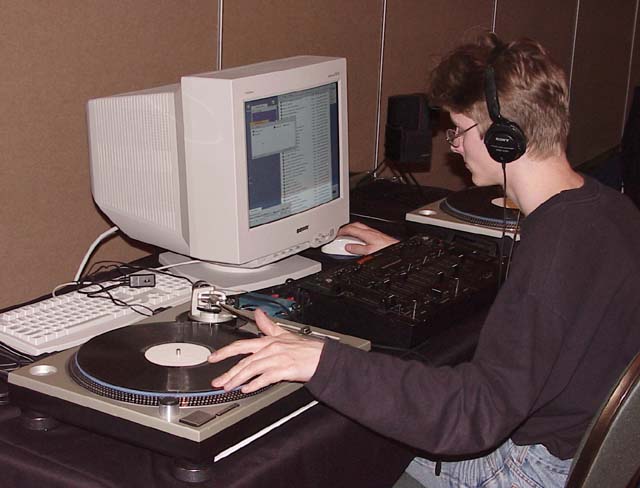
    DJ Setup (Equipment):

    Final Scratch- Is a DJ software that allows manipulation and playbacks what has been inputted.
    By placing the vinyl on the turntable the signals are interpreted  by a computer which is connected via a "Scratch Amp".

    Pros
    • Allows you to play any track that you have on your hard drive 
    • Prevents needle skips

    Cons
    • Not alot of control to mix and EQ tracks, that's all done on the computer so no freedom of movement


    Technology Comparisons 
    Traktor software and DJ controller 

    DJ Equipment


    Tracktor software and DJ controller
    Pros 
    • Loops that can instantly be tracked with a press of a button
    • Beat detection grid that automatically detects where the beat is so that 'beat-matching' is easier
    • Sync lock to keep a specific track matched to another tracks tempo, even if song is changed
    • MIDI Controller acts like a turntable with a mixer on it so it can be carried around easier than two pieces of equipment
    •  Offers a chance to EQ the Lows, Mids and highs of a track individually 
    • Cue points stay on a track digitally so if that mp3 is put into another Trakor it is saved
    • Sound effects such as sirens can be used
    • Filters can be used, So a DJ can remove the bass of a song and then bring it back up for an effect.
    Cons
    • Price of certain MIDI controllers are expensive but if DJ'ing is something you are interested in the this is something you should definitely invest in this as it is the best it can get.

    Conclusion

    Analog set-up


    Pros:
    • Better sound quality
    • Much cheaper than a digital DJ Setup
    • Authentic crackling noise
    Cons:
    • Less effects 
    • Fragile and heavy equipment
    • Cue points and syncing must be done manually
    • Needle skips may be frequent 

    Compared to a digital set up the Analog set up has a more of an authentic feel to it due to the crackling and the fact that most of the sounds is produced by hands and not a electronic cue point. But the analog set up lacks the freedom that the digital set up offers meaning that there is less choice for effects and cue points must be done manually which is almost impossible if you are trying to be fast and have fluency to your set also another thing that the analog set up is lacking is the versatility as to change song you must change vinyl which is time consuming

    . Digital Setup

    Pros:
    • Allows DJ's to use any song on the internet
    • Allows beat matching and syncing to be done in a click of a button 
    • Cue points are imprinted on the mp3
    • Has a wide range of effects and loops 
    Cons:
    • MP3 sound quality can't ever compare to vinyl
    • The price for equipment is high and is forever rising as new technology is released
    Compared to an analog set-up digital adds more control and gives the DJ more features to play around with and to create a unique sound. With the ability to EQ sounds and filter sounds and sound effects. Also music is stored on the laptop/computer and is easily accessed and can be dragged and dropped into the track. Also DJ techniques are easier on the digital set up as you can beat match with a click of a button.

    Bibliography

    Scratch - Film
    Phil Robinson - Teacher 

    Tuesday, 26 November 2013

    Hear and Identify

    Hear and Identify

    Finding faults within the track called ‘Bad version’ comparing it to the ‘goodish version’, and giving feedback on ways to improve it and prevent this from happening in the future. I will also be commenting critically on whether the mistakes would affect the tracks success or not

    Faults

    • In the recording there is a Cough at 0:03.This can be fixed by cropping it out whilst using logic by slicing the area of the audio file you want gone and deleting it, this will remove the cough. Another way you can remove this is to re-record the recording again and this time restrain from coughing as the artist would be warned that the recording is starting because of the 3 metronome beeps. The cough will affect the overall success of the track as it seems unprofessional and will not be taken seriously as the artist did not seem that bothered about a mistake at the bottom.


    • In the ‘bad version’ the Bass Velocity levels are lower than in the ‘goodish version’. The bass in the bad version was being overpowered by the other instruments and was not coming through as heavy as it should have. This can be fixed by opening up Piano roll on logic by pressing ‘P’ and then pressing ‘Esc’ to bring up the toolbox, Once the toolbox is opened you selecting the velocity tool and drag it up individually or you can go to ‘transform’ and select ‘fixed velocity’ to make all the MIDI data in the pattern a certain velocity. This would affect the overall success of the track because the instrumental is not mixed properly so when played on professional sound systems it will lack substance and all be distorted. This can be fixed by mixing and mastering the recording properly.


    • In the ‘bad version’ there is Popping at 0:19. This can be fixed by buying a pop shield or by lowering the microphones sensitivity to the vocals. This will make the recording clearer and remove other sounds as well as the popping. The popping of the vocals makes it seem unprofessional as the proper equipment is not used and therefore it is hard to listen and the track would not be deemed successful.


    • In the ‘bad version’ there is an Out of rhythm segment at 0:22. This can be fixed by re-recording the vocals. Compared to the ‘goodish version’ the vocal is out of rhythm and sounds dodgy it just doesn't fit right and whenever that error is playing it is noticeable and makes the whole production seem unprofessional.


    • In the ‘bad version’ the Panning is done wrong and the song comes through my predominantly on the right side this can be fixed by changing the mastering output panning to ‘0’ this will mean that the song will be distributed equally from both headphone sides. This will make the track unsuccessful as it would not get any attention as proper attention was not paid to the final product and it lacks professionalism.


    • In the ‘bad version’ the Ending is not cut properly, This means that the vocal just suddenly cuts off meaning that no fade out was created and this can result in clipping if a speaker goes from sound to nothing. To prevent this fade ins and fade outs should be used at every new vocal file to make sure that the whole piece comes together and the final product is of a good standard.


    • In the ‘bad version’ there is a Static noise at 0:44 this could have been caused by wires being removed while the file is being bounced to a wav. Or mp3. This would result in a surge being passed through the interface affecting the output sound. Or it could be caused by a mobile phone passing signals by the microphone and being picked up this can be fixed by removing the audio by slicing it and deleting it. This was not an obvious mistake it took me several listens to find the mistake, but if it was listening to on a professional system the mistake would be very obvious so it would not be professional to leave the static sound.


    • In the ‘bad version’ the track is Unmixed (muffled voice, Vocals not standing out) this can be fixed by mixing down the track and EQing the vocals so that they stand out and the whole track comes together this is because without it the track sounds unprofessional. With the track being cleared it will be easier for the listener and make it more of a smoother listen rather than having to distinguish what each word is. So for the track to be considered successful the track would have to be mixed down properly.  


    • In the ‘bad version’ the Breathing between vocals is not cut out this could be successful if it was an acoustic version or something live but because this is meant to be a studio recorded track it would have to be removed. This could be fixed by removing the breathing individually by selecting the area of the audio file where the breathing is present and deleting it. It is a time consuming bit of work but for a studio sound this would have to be done to sound as professional as possible. The breathing wouldn't affect the success of the track because it is a minor mistake and shouldn't affect the overall quality of it.


    • In the ‘bad version’ the backing vocals are too high and are not backing vocals there are probably the same decibels as the main vocals. This can be fixed by turning down the overall volume of the track. As the backing vocals do not sound like backing vocals it sounds unprofessional and this mistake would affect the overall success of the track because a successful track would have a set volume for backing vocals and main vocals.


    • In the ‘bad version’ the instrumental ended early and abruptly which was a shock to listen to as the instrumental carries on in most popular and successful songs. Compared to the ‘goodish version’ it ends early and possibly before the vocals end, this can be fixed by added on more of the instrumental in logic by dragging the MIDI data over or if it is not a MIDI Data then it can be played again until it fits nicely over the vocals and plays for a short time after the vocals actually finish.


    • In the ‘bad version’ there is background noise at 0:02 this is because the audio file has not been cut to the start of the singing. This will affect the success of the track because this is a mistake that makes the whole product sound unprofessional. The background noise can be removed by slicing and removing the point at which the noise is heard and then the noise will not be heard and the track will seem professional.